Hold a key, say what you're thinking, release. Your words appear wherever your cursor is. Powered by on-device AI. No cloud, no subscription, no data collection.
How it works
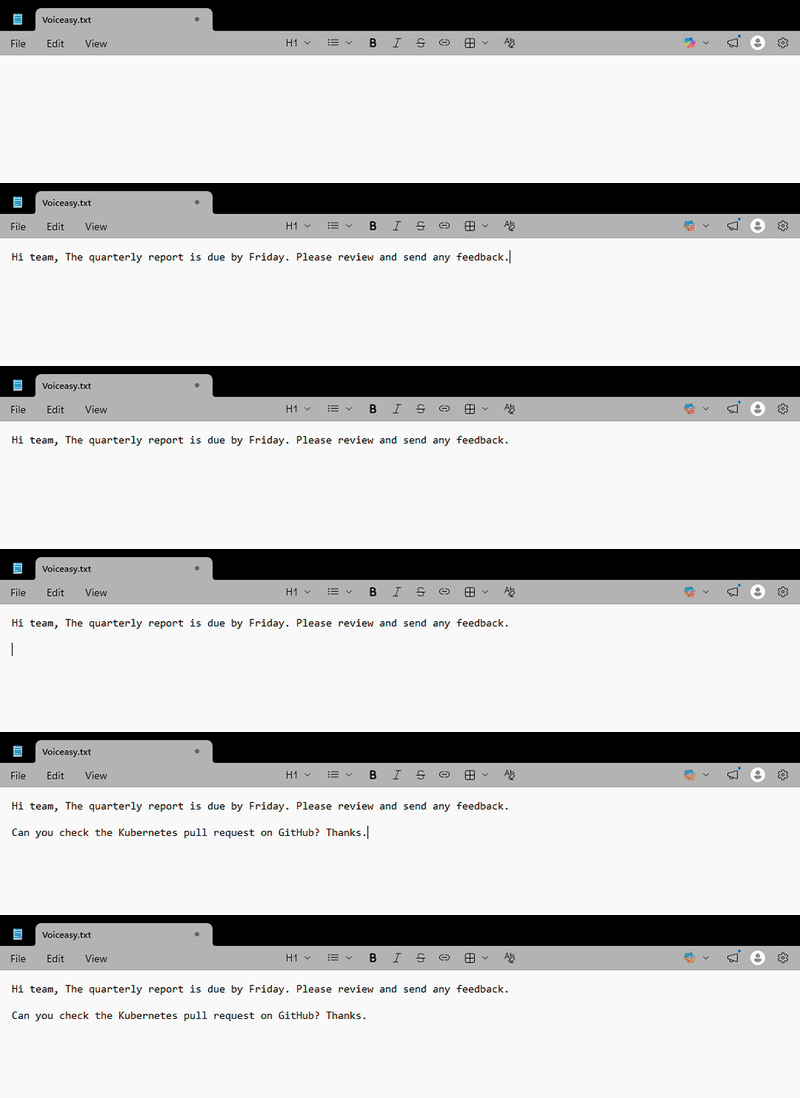
Press and hold Ctrl+Space to start recording. Customizable to any key combo you prefer.
Talk at your normal pace. No need to enunciate or use special commands.
Let go and your transcribed text is instantly pasted into whatever app you're using.
Features
Whisper AI runs entirely on your machine. No cloud, no internet needed. Your audio is never uploaded anywhere.
Browser, IDE, Slack, email, terminal, Word. If you can type there, Voiceasy can paste there.
Teach Voiceasy your jargon. Add tech terms, client names, or acronyms to your personal dictionary.
Misheard something? Hit Ctrl+Shift+Space to re-transcribe with higher accuracy and AI cleanup.
Pay once, use forever. No monthly fees, no usage limits, no account required. It's your software.
Built for Windows 10/11 from day one. Not a Mac port. Uses native APIs for reliable, fast performance.
Comparison
| Voiceasy | Cloud dictation apps | Built-in Windows dictation | |
|---|---|---|---|
| Price | Free | ~$10-15/mo | Free |
| Privacy | 100% local | Cloud-based | Cloud-based |
| Windows support | Native | Mac-first | Native |
| Works in any app | ✓ | ✓ | Limited |
| Custom vocabulary | ✓ | ✕ | ✕ |
| Accuracy | Good | Excellent | Basic |
Pricing
Free forever
$0
Pay what you want. Suggested: $10 if you find it useful.
Speed
FAQ
Download. Install. Hold Ctrl+Space. That's it.
Download for Windows (Free) voice
voice